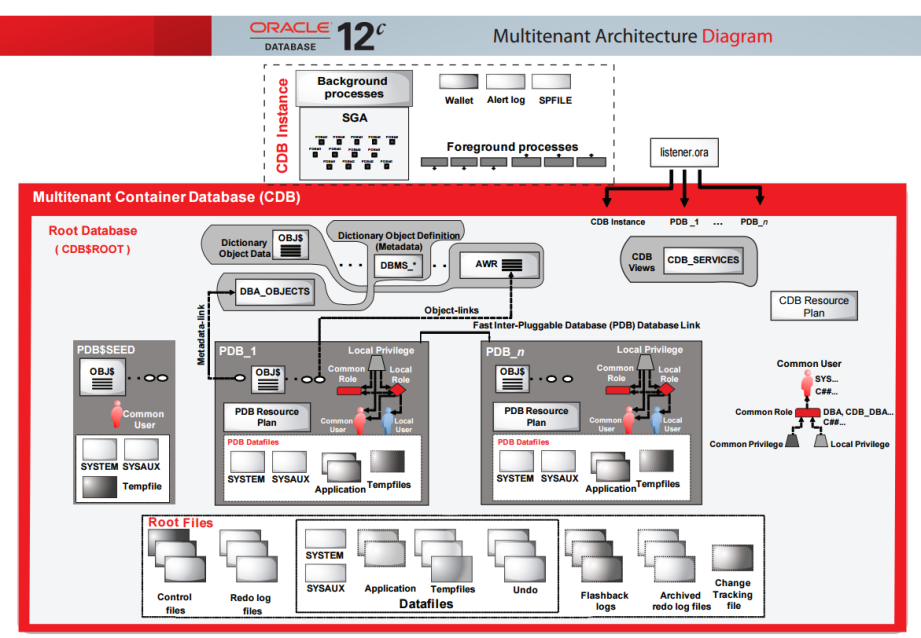
With 12c you might have always heard of multitenant architecture and Container & pluggable Database, so we’ll start with understanding these things. Also 12c configuration has following option:-
- Multitenant configuration A CDB consists of zero, one, or more PDBs. You need to license the Oracle Multitenant option.Single-tenant configuration Doesn’t require the licensed Oracle Multitenant option
Non-CDB This is the same as the pre–Oracle 12 c database architecture.
A multitenant container database has three types of containers:- The Oracle supplied container is called the root container (CDB$ROOT) and consists of just Oracle metadata (and maybe a little bit of user data) and common users. Each CDB has one root.
The user container , which is actually called a pluggable database (or
PDB), consists of user metadata and user data.
Each of these—the root, the seed, and the PDB(s)—is called a container, and each container has a unique container ID (CON_ID) and container name (CON_NAME). Each PDB also has a globally unique identifier (GUID)
The idea behind the concept of a container is to separate Oracle metadata and user data by placing the two types of data into separate containers. That is, the system and user data are separated. There’s a SYSTEM tablespace in both the central container and the PDB containers, however, they contain different types of data. The root container consists of Oracle
metadata whereas the PDB container’s SYSTEM tablespace contains just user metadata. The Oracle metadata isn’t duplicated by storing it in e
ach PDB—it’s stored in a central location for use by all the PDBs that are part of that CDB. The CDBs contain pointers to the Oracle metadata in the root container, thus allowing the PDBs to access these system objects without duplicating them in the PDBs
A CDB has similar background processes and files as a normal non-CDB database. However, some of the processes and files are common for both
a CDB and its member PDB databases, and some aren’t.
Common Entities between CDB and PDBs- Background processes There’s a single set of background processes for the CDB. The PDBs don’t have any background processes attached to them.
- Redo log files These are common for the entire CDB, with Oracle annotating the redo data with the identity of the specific PDB associated with the change. There’s one active online redo log for a single-instance CDB or one active online redo log for each instance of an Oracle RAC CDB. A CDB also has a single set of archived redo log files.
- Memory You allocate memory only to the CDB, because that’s the only instance you need in a multitenant database.
- Control files These are common for the entire CDB and will contain information that reflects the changes in each PDB.
- Oracle metadata All Oracle-supplied packages and related objects are shared.
- Temporary tablespace There’s a common temporary tablespace for an entire CDB. Both the root and all the PDBs can use this temporary tablespace. This common tablespace acts as the default TEMP tablespace. In addition, each PDB can also have a separate temporary tablespace for its local users.
- Undo tablespace All PDBs use the same undo tablespace. There’s one active undo tablespace for a single-instance CDB or one active undo tablespace for each instance of an Oracle RAC CDB.
- Tablespaces for the applications tables and indexes These application tablespaces that you’ll create are specific to a PDB and aren’t shared with other PDBs, or the central CDB. The data files that are part of these tablespaces constitute the primary physical difference between a CDB and a non-CDB. Each data file is associated to a specific container.
- Local temporary tablespaces Although the temporary tablespace for the CDB is common to all containers, each PDB can also create and use its own temporary tablespaces for its local users.
- Local users and local roles Local users can connect only to the PDB where the users were created. A common user can connect to all the PDBs that are part of a CDB.
- Local metadata The local metadata is specific to each application running in a PDB and therefore isn’t shared with other PDBs.
- PDB Resource Manager Plan These plans allow resource management within a specific PDB. There is separate resource management at the CDB level.
Oracle metadata. Data files are associated with a specific container. A permanent tablespace can be associated with only one container. When you create a tablespace in a container, that tablespace will always be associated with that container.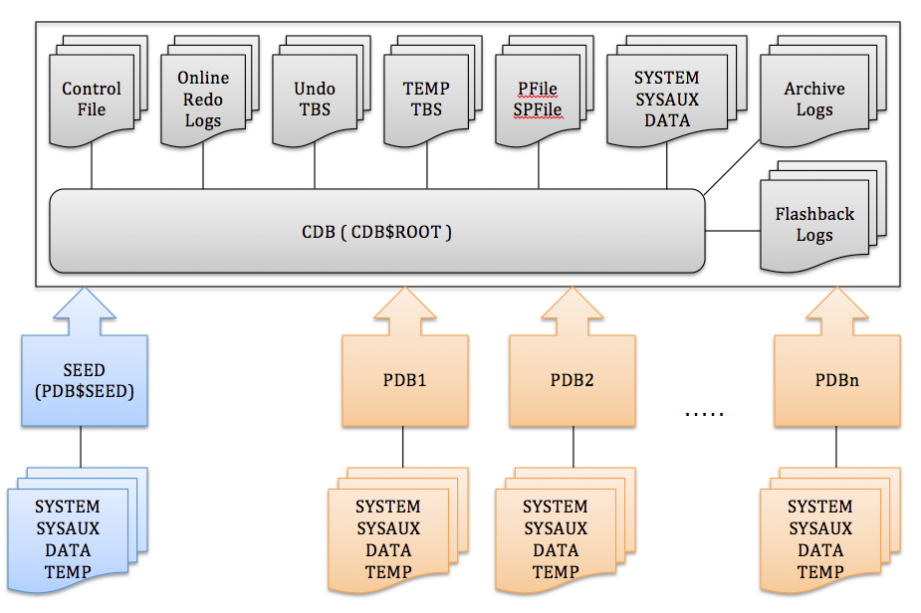
So it doesn’t mean that 12c is only about multitenant configuration, it can be configured as the same way as your beloved 11g.
Multitenant Architecture
For those of you who have worked with SQL Server, Sybase etc this architecture won’t be new. Basically till 11g we used to have 1 instance for 1 database (excluding RAC cases for simplicity), so even you have a very small application you need to have a separate instance for that database, separate instance means memory, process and everything (But then Oracle was designed to handle large & critical databases). So with the changing requirements Oracle has changed its architecture where you can have multiple databases within a single instance. To build a little perspective on CDB (CDB$ROOT) and PDB think of this single instance as CDB and multiple databases as PDB.
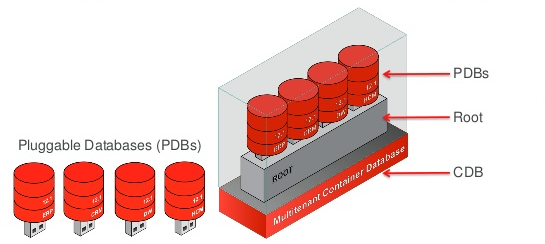
Now its time to understand what is CDB & PDB, how is memory allocated to these different PDB, how does CDB maintains PDBs, where’s REDO, where’s UNDO, etc.
CDB & PDB
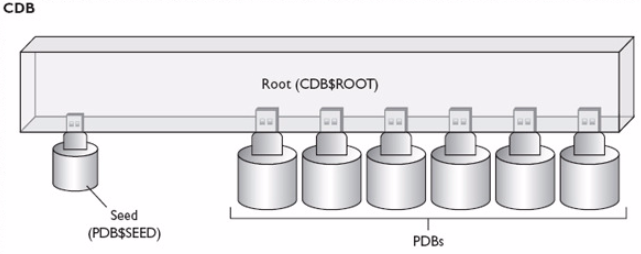
A CDB contains a set of system data files for each container and a set of user-created data files for each PDB. Also CDB contains a CDB resource manager plan that allows resources management among the PDBs in that CDB.
Entities Exclusive for PDBs
Above diagram depicts what a CDB contains and what a PDB contains.
