Showing posts with label R12. Show all posts

Friday, October 5, 2018

Useful EBS R12 Queries for Apps DBA

Below are some useful EBS R12 Queries for Apps DBA. We can modify these queries as per our requirement.

To find SQL ID, SQL_TEXT from Request ID / Others
=========================================
col oracle_process_id format a5 head OSPID
col inst_name format a10
col sql_text format a30
col outfile_tmp format a30
col logfile_tmp format a30
select /*+ ordered */
fcr.request_id,
fcp.user_concurrent_program_name
,      round(24*60*( sysdate - actual_start_date )) elapsed
,      fcr.oracle_process_id
,      sess.sid
,      sess.serial#
,      inst.inst_name
,      sa.SQL_ID
from   apps.fnd_concurrent_requests fcr
,      apps.fnd_concurrent_programs_tl fcp
,      apps.fnd_concurrent_processes cp
,      apps.fnd_user fu
,      gv$process pro
,      gv$session sess
,      gv$sqlarea sa
,      sys.v_$active_instances inst
where  fcp.concurrent_program_id = fcr.concurrent_program_id
and    fcp.application_id = fcr.program_application_id
and    fcr.controlling_manager = cp.concurrent_process_id
and    fcr.requested_by = fu.user_id (+)
and    fcr.oracle_process_id = pro.spid (+)
and    pro.addr = sess.paddr (+)
and    sess.sql_address = sa.address (+)
and    sess.sql_hash_value = sa.hash_value (+)
and    sess.inst_id = inst.inst_number (+)
and    request_id in (select request_id from fnd_amp_requests_v)
and sa.SQL_ID='2xzwjprnn80x3'
;

To Kill Any Inactive Session in RAC Database
========================================
select 'alter system kill session ''' ||c.sid||','||c.serial#||''||',@' || inst_id || '''' || ' immediate; ' from gv$session c
where program like 'frmweb%' and module like '%frm%' and seconds_in_wait > 18000 and c.status='INACTIVE' ;


Find Concurrent Request from sql_id from AWR Report
============================================
select c.request_id, status_code, phase_code, USER_CONCURRENT_PROGRAM_NAME,d.user_name requestor, s.sid,p.spid,s.process,s.osuser
from v$session s, v$process p, apps.fnd_concurrent_requests c,apps.fnd_concurrent_programs_tl ct, apps.fnd_user d
where oracle_process_id=p.spid
and s.paddr=p.addr and
ct.concurrent_program_id=c.concurrent_program_id
and c.requested_by = d.user_id
and s.sid in (select sid from gv$session where sql_id='2xzwjprnn80x3');

Kill Inactive Forms Sessions
======================
set pagesize 1200;
set linesize 1200;
select 'kill -9 ' || p.spid from v$session s, v$process p where s.paddr = p.addr and s.sid in (select sid from v$session where status like 'INACTIVE' and logon_time < sysdate-0.33 and action like 'FRM:%');

Find details on any specific Inactive Program / Action 
===================================================
select distinct b.sid,b.serial# ,b.status,b.program,b.username,b.action,b.module,
to_char( b.logon_time, 'dd-MON-yyyy hh24:mi:ss' ) logon_time,
trunc( sysdate-b.logon_time ) "Dy",
trunc( mod( (sysdate-b.logon_time)*24, 24 ) ) "Hr",
trunc( mod( (sysdate-b.logon_time)*24*60, 60 ) ) "Mi",
trunc( mod( (sysdate-b.logon_time)*24*60*60, 60 ) ) "Sec"
from gV$access a,gv$session b, gv$process c
where a.sid=b.sid
and b.paddr=c.addr
and b.status='INACTIVE'
and (b.action like '%FRM%' or b.action like '%frm%' or b.program like '%TOAD%' or b.program like '%toad%' or b.program like
'SQL%' or b.program like '%sql%' or b.program like '%FRM%'
or b.program like '%frm%' or b.action like 'SQL%' or b.action like 'sql%' or b.action like 'TOAD%' or b.action like 'toad%')
and (trunc( mod( (sysdate-b.logon_time)*24,24)) >=12 or trunc( sysdate-b.logon_time )>=1);


Find Top CPU Consuming Inactive / Active Sessions
============================================
SELECT s.SID, s.serial#, p.spid AS "OS PID",s.username, s.status, s.module, st.VALUE/100 AS "CPU sec"
FROM gv$sesstat st, gv$statname sn, gv$session s, gv$process p
WHERE sn.NAME = 'CPU used by this session' -- CPU
AND st.statistic# = sn.statistic#
AND st.SID = s.SID
AND s.paddr = p.addr
AND s.last_call_et > 18000
--and s.status='INACTIVE' and rownum < 25
ORDER BY st.VALUE DESC ;

To check pfile/spfile parameters Change History
======================================
set linesize 155
col time for a20
col parameter_name format a50
col value for a20
col snap_id for 9999999
break on instance skip 3
select a.snap_id,to_char(end_interval_time,'DD-MON-YY HH24:MI:SS') TIME, parameter_name, value
from dba_hist_parameter a, dba_Hist_snapshot b, v$instance v
where a.snap_id=b.snap_id
and a.instance_number=b.instance_number
and parameter_name like nvl('&parameter_name',parameter_name)
and v.instance_number = a.instance_number
order by 1,2
/

To check all hidden parameters

======================================
set lines 200
col "Parameter" for a60
col "Session_Value" for a30
col "Instance_Value" for a30
SELECT a.ksppinm "Parameter",
       b.ksppstvl "Session_Value",
       c.ksppstvl "Instance_Value"
FROM   x$ksppi a,
       x$ksppcv b,
       x$ksppsv c
WHERE  a.indx = b.indx
AND    a.indx = c.indx
AND    a.ksppinm LIKE '/_%' escape '/'; 

10046 Trace with Binds & Waits for concurrent request
=============================================
1) select oracle_process_id from fnd_concurrent_requests where request_id='&req_id';
2) select inst_id,pid,addr from gv$process where spid='&oracle_process_id'; (provide spid from 1st query)
3) select sid,serial#,paddr,sql_id from gv$session where paddr='&addr' and inst_id='&inst_id'; (provide addr from 2nd query)  ## add other columns, if you would like to
4) select sql_fulltext from v$sql where sql_id='&sql_id' and inst_id='&inst_id';  ## add other columns, if you would like to

==== OR =====

3) oradebug setorapid <pid> (Provide pid – from 2nd query)
4) oradebug unlimit
5) oradebug event 10046 trace name context forever,level 12
6) oradebug tracefile_name (It will show the trace file location)
7) oradebug event 10046 trace name context off; (Execute this command once Concurrent request is completed)

Repeat above steps for as many concurrent requests.

==> tkprof <tracefile_name> <outfile_name> explain=apps/<pwd> sort=exeela,fchela sys=no


Saturday, June 27, 2015

What are source environment file settings in Oracle Applications R12

These days preparing for Oracle EBS R12 1Z0-238 Exam, so pasting here only for my knowledge purpose...

On UNIX, Oracle E-Business Suite includes a consolidated environment file called APPS< CONTEXT_NAME>.env, which sets up both the Oracle E-Business Suite and Oracle technology stack environments. When you install Oracle E-Business Suite, Rapid Install creates this script in the APPL_TOP directory. Normally need to source the environment file prior to any upgrade-maintenance task. At that time, you can do this action from the application tier owner user.

Suppose APPL_TOP = /u01/apps/apps_st/appl
.  /u01/apps/apps_st/appl/APPS< CONTEXT_NAME >.env

On Windows, the equivalent consolidated environment file is called %APPL_TOP%\envshell< CONTEXT_NAME >.cmd. Running it creates a command window with the required environment settings for Oracle E-Business Suite. All subsequent operations on the APPL_TOP (for example, running adadmin or adpatch) must be carried out from this window.

Similar to setting up of database environment, you can perform this action from database tier owner user.
Suppose RDBMS_ORACLE_HOME = /u01/oracle/db/tech_st/11.1.0
. /u01/oracle/db/tech_st/11.1.0/< CONTEXT_NAME >.env

Several other key environment files are used in an Oracle E-Business Suite system.

The adovars.env file
The adovars.env file, located in $APPL_TOP/admin, specifies the location of various files such as Java files, HTML files, and JRE (Java Runtime Environment) files. It is called from the main applications environment file, < CONTEXT_NAME >.env. The adovars.env file includes comments on the purpose and recommended setting of each variable. In a Release 12 environment, adovars.env is maintained by AutoConfig, and should not be edited manually.

The adconfig.txt file
AD utility programs perform a variety of database and file management tasks. These utilities need to know certain configuration information to run successfully. This configuration information is specified when Oracle E-Business Suite is installed, and subsequently stored in the adconfig.txt file in the /admin directory.

The fndenv.env file
This file sets additional environment variables used by the Application Object Library.
For example, it sets APPLBIN as the name of the subdirectory where product executable programs and shell scripts are stored (bin). This file should not be modified: the default values are applicable for all customers. The file is located in the FND_TOP directory.

The devenv.env file
This file sets variables that let you link third-party software and your own custom-developed applications with Oracle E-Business Suite. In Release 12, this script is located in FND_TOP/usrxit, and is automatically called by fndenv.env. This allows you to compile and link custom Oracle Forms user exits and concurrent programs with Oracle E-Business Suite.


Monday, November 17, 2014

Fix for "Internet explorer has closed this webpage to help protect your computer"

Many users face issue running Oracle forms on Microsoft Internet Explorer 8 (IE8) which causes the page to redirect to following url
res://ieframe.dll/acr_depnx_error.htm#<domain>,http://<server>:<port>/forms/frmservlet?config=<config>

It displays following error.
Internet explorer has closed this webpage to help protect your computer
A malfunctioning or malicious add-on has caused Internet Explorer to close this webpage.


Solution:
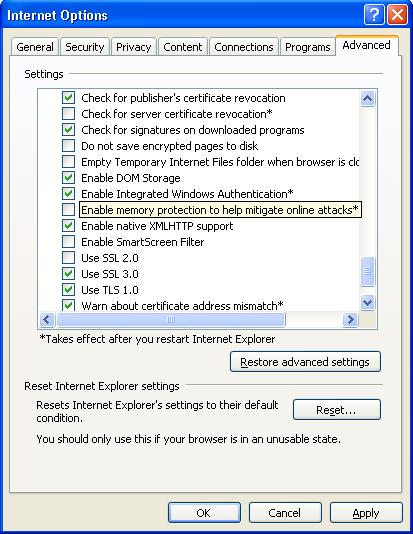
Go to Internet Explorer -> Tools -> Internet Options -> Advanced -> Scroll down to Security -> Uncheck “Enable memory protection to help mitigate online attacks*”
Close all browser windows and restart the browser. The issue should have been fixed :-)


Edit: Alternatively you can use either of following 2 alternate solutions.

Alternate 2:

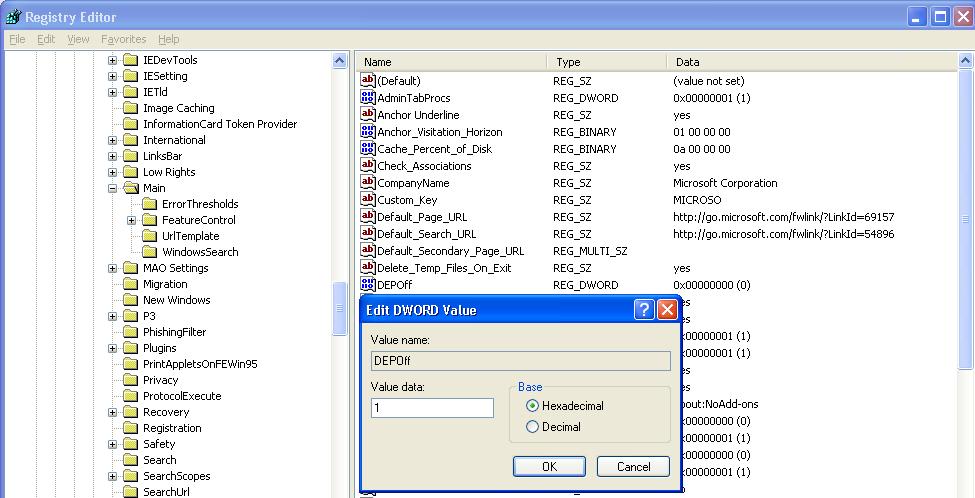
Open registry using start->Run->regedit->ok
Go to HKEY_LOCAL_MACHINESOFTWAREMicrosoftInternet ExplorerMain
On the right hand side you will see a DWORD key called DEPOff. IF this is set to value 0, just change it to 1 and close registry editor.


Restart Internet Explorer and check if the problem has been fixed or not.

Alternate 3:

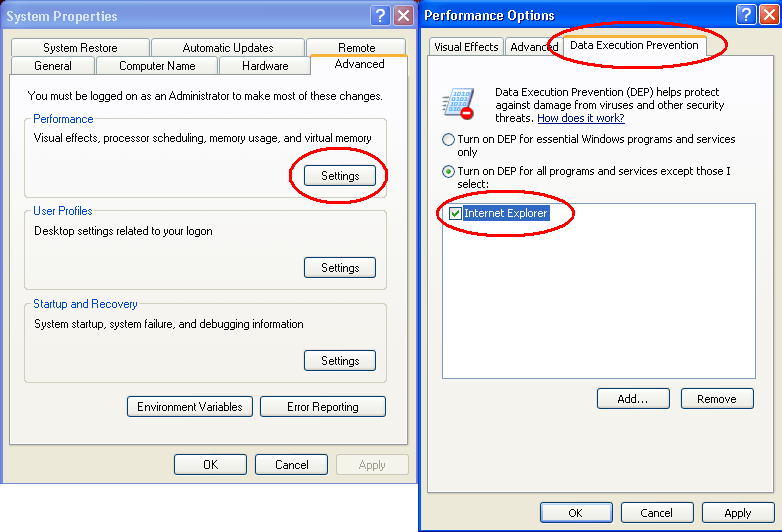
Right click on My Computer->Properties (or start->Run->sysdm.cpl->ok)
Click on “Advanced” Tab. Click on “Settings” button next to Performance.
Click on last tab “Data Execution Prevention
Select Second option and then select “Internet Explorer” from the bottom pan.
(If “Internet Explorer” is not already present there then just click on “Add” and then select “c:Program FilesInternet Exploreriexplore.exe”)


Click OK and restart internet explorer. The problem should have been fixed.

Wednesday, November 12, 2014

Mulitinode EBS R12 Installation on VirtualBox (Step by Step)

Here I'm uploading a step by step approach document to Install Mulitinode EBS R12 (12.1.1) on VirtualBox (Step by Step) followed by 12.1.3 Upgrade. (it was quite old but forgot to upload)


Further to this, it was upgraded from R12.1.1 to R12.1.3. Below is the link in which some known/unknown issues were mentioned/reported during upgrade process.

http://manishnashikkar.blogspot.in/2013/10/some-issues-faced-during-upgrade-to-r12.html

Please let me know, if you want this document on your mail id. plus your suggestions and feedback are welcome.

- Manish Nashikkar


Monday, November 3, 2014

Issues while Upgrading IAS to 10.1.3.5 for R12.1.3


Always remember to set $INST_TOP/ora/10.1.3/{SID_hostname}.env before starting IAS Upgrade.

Issue 1) While doing IAS Upgrade to 10.1.3.5, the following error occurred,


The runInstaller cannot found the opmn port number in opmn_port.
File 10.1.3_ORACLE_HOME/install/opmn_port is null.

To resolve above issue, followed "IAS Upgrade - OPMN Port Information is Unavailable (Doc ID 1545145.1)"

1. Check for correct opmn port of current instance:
$ADMIN_SCRIPTS_HOME/adopmnctl.sh status -port

2. Add it to file 10.1.3_ORACLE_HOME/install/opmn_port:
opmn_port = <the value returned from step1>

3. Click 'OK' in runinstaller to continue the patch application.


Issue 2) oc4jadmin password could become an issue when installing 10.1.3.5 Techstack software in Oracle 12.1.3 EBS. Its important to know that we are providing right oc4jadmin password.

I didn't know password for oc4jadmin, as I also tried to check my luck with some standard passwords like welcome1, welcome, oafm, secret with below command, but not worked 

How to verify:

java -jar $IAS_ORACLE_HOME/j2ee/home/jazn.jar -checkpasswd jazn.com oc4jadmin -pw *****
Unsuccessful verification of user/password pair.

***** = oc4jadmin password


The message should be successful. If not the password can be changed in system-jazn-data.xml file, for which I used "How to reset "oc4jadmin" password for standalone OC4J version 10.1.3 (Doc ID 360130.1)" 

1. Shutdown all opmn services :

cd $ADMIN_SCRIPTS_HOME
adstpall.sh / adopmnctl.sh stopall

2. cd $ORACLE_HOME/j2ee/home/config

Here ORACLE_HOME= Oracle Application server home, ie, 10.1.3 HOME
Take a backup of system-jazn-data.xml and edit the below content:

<user>
<name>oc4jadmin</name>
<display-name>OC4J Administrator</display-name>
<guid>93E5A2505D1511DEBF8E89BC12E10097</guid>
<description>OC4J Administrator</description>
<credentials>!mynewpassword</credentials>
</user>

Marked in bold is the details to be changed and that is the password. Note an ! mark has to prefixed with the password.

3. Start all opmn services.

Whenever autoconfig is run after this activity, the password changes to encrypted format.


To Verify Again,

java -jar $IAS_ORACLE_HOME/j2ee/home/jazn.jar -checkpasswd jazn.com oc4jadmin -pw *****
Successful verification of user/password pair.

Issue 3) In Post-Installation, while Configuration Assistants run to apply One-Off Patches, I had faced several issues w.r.t. opatch rollback because of bug conflict. (you may or may not face this issue)

Hence checked in /etc/OraInventory logs. Rolled-back some opatches manually, also renamed/moved some files (eg. like  which were creating problem while rolling back some patches. After that applied required patches manually OR clicked on Retry button, and completed installation successful.

[cbos -> appebs:/etc/oraInventory/logs] :tail -100f installActions2014-11-15_11-29-40PM.log
The following files had problems with being restored:
1.      /d04_r12prodapp/oracle/apps/tech_st/10.1.3/lib32/libnnz10.so

Replying 'Y' will terminate the patch roll-back immediately. It WILL NOT restore any updates that have been performed to this point. It WILL NOT update the inventory.
Replying 'N' will update the inventory showing the patch has been removed.

Do you want to STOP?
Please respond Y|N >
 Y (auto-answered by -silent)

ERROR: OPatch failed during patching, possibly due to missing files.
File Back-up Errors!

OPatch did not complete successfully...
------------------------------------------------------------------------------------------------------------
Restore Jar File
OPatch encounters the following file roll-back issues:
The following files had problems with being restored:
1.      /d04_r12prodapp/oracle/apps/tech_st/10.1.3/lib32/libnnz10.so

Replying 'Y' will terminate the patch roll-back immediately. It WILL NOT restore any updates that have been performed to this point. It WILL NOT update the inventory.
Replying 'N' will update the inventory showing the patch has been removed.

Do you want to STOP?
Please respond Y|N >
 Y (auto-answered by -silent)

File Back-up Errors!
ERROR: OPatch failed during patching, possibly due to missing files.

Workaround: mv /d04_r12prodapp/oracle/apps/tech_st/10.1.3/lib32/libnnz10.so /d04_r12prodapp/oracle/apps/tech_st/10.1.3/lib32/libnnz10.so.orig.151114


I hope this might be useful to you.

Thanks,
Manish

Self Service (html/jsp) Pages turn to complete Dark Blue / Messed in R12


After Patching HRMS RUP7 & Upgrading JRE/JDK 7 w.r.t. OracleAS 10.1.2 found issue with login page which was showing in Dark Blue, futher other OAF Pages too were improper due to which difficulty in reading some of the text


For above issue, followed below Action Plan from Oracle Support and Issue is resolved,


1. cd $OA_HTML 


2. mv ./cabo/styles ./cabo/styles.bak 


3. unzip marlin_html.zip in $OA_HTML (version 84 from rup7) 


4. copy to $OA_HTML/cabo/styles the files from $OA_HTML/cabo/styles.bak like the following: 

bistyles.xss
custom.xss 
custom.xss.pre_R12
mainMenuTree.css
OAFSlideoutMenu.css
OAFSlideoutMenu_rtl.css
oa.xss

5. Shutdown all application services 


6. Take backup of all files in following directories from application tier . 


$OA_HTML/cabo/images/cache 

$OA_HTML/cabo/styles/cache 

7. Remove all files in above 2 directories 


8. Restart services. (Bounce the Apache + OACORE OC4J processes)


9. Clear the client side browser cache, java cache, restart the browser and test and check in multiple desktops


Useful Documentation:


Look And Feel Of Self Service Pages Are Messed After R12 Upgrade ( Doc ID 1556590.1) 


Self Service Pages turn to complete Dark Blue in Release 12 (ID 1054332.1)


How To Clear Caches (Apache/iAS, Cabo, Modplsql, Browser, Jinitiator, Java, Portal, WebADI) for E-Business Suite? (ID 742107.1)


- Manish

REP-0069: Internal error java.lang.UnsatisfiedLinkError: nio (Not found in com.ibm.oti.vm.bootstrap.library.path)

This error can be seen after 12.1.1, 12.1.3 Upgrade, also after JRE, JDK 7 Upgrade on IBM AIX 7.1 OS.

Issue:
All Concurrent Requests were going into the error with following error in logfile,
REP-0069: Internal error

Cause:
If you see the error message, java.lang.UnsatisfiedLinkError: net, it actually refers libnet.so here.. java.lang.UnsatisfiedLinkError: nio (Not found in com.ibm.oti.vm.bootstrap.library.path) libnet.so is in java directory.. exactly in this subdirectory --> jre/lib/ppc

Resolution / Workaround:

Check LD_LIBRARY_PATH & LIBPATH in Context File. It should contain jre/lib/ppc absolute path. In my EBS Environment, it was missing hence I added and ran autoconfig.

<LD_LIBRARY_PATH oa_var="s_tools_ldlib" osd="IBM_AIX">/u01/prod/oracle/apps/tech_st/10.1.2/lib32:/u01/prod/oracle/apps/tech_st/10.1.2/lib:/u01/prod/oracle/apps/tech_st/10.1.2/jdk/jre/lib/ppc:/usr/dt/lib:/u01/prod/oracle/apps/tech_st/10.1.2/jdk/jre/bin:/u01/prod/oracle/apps/tech_st/10.1.2/jdk/jre/bin/classic:/u01/prod/oracle/apps/apps_st/appl/sht/12.0.0/lib</LD_LIBRARY_PATH>


This action was fixed my problem.

Thanks,
Manish

Tuesday, September 9, 2014

Target node/queue unavailable in R12

Today, w.r.t Concurrent Managers and some Other Managers, status field was showing message "Target node/queue unavailable" and Node Field was appearing Blank. This was our Production Instance and not any Cloned Instance.

After Checking Several Metalink Note ID's, I decided to follow below steps,

OAM Generic Collection Service shows State: "The target node/queue unavailable". [ID 393706.1] (it's given for 11i, but still worked for me in R12)
After Cloning all the Concurrent Managers do not start for the cloned Instance [ID 555081.1]
Conflict Resolution Manager Shows Target Node/Queue Unavailable [ID 732709.1]
Concurrent Managers Do Not Start After Cloning Nodes Not Updated In Conc_queues [ID 466532.1]
Summary of Possible Reasons and Solutions for the Problem Where All Concurrent Requests Stuck in Pending Phase [ID 182154.1]
Output Post Processor is Down with Actual Process is 0 And Target Process is 1 [ID 858813.1]

Solution which worked for me

SQL> set lines 200
SQL> column CONTROL_CODE format A15

SQL> select CONCURRENT_QUEUE_NAME, CONTROL_CODE , TARGET_NODE, NODE_NAME   from FND_CONCURRENT_QUEUES where concurrent_queue_name like 'OAMGCS_%';

CONCURRENT_QUEUE_NAME          CONTROL_CODE    TARGET_NODE
------------------------------ --------------- ------------------------------
NODE_NAME
------------------------------
OAMGCS_CBOS                    E
CBOS

The standard codes used by Oracle Applications are as followings:

'A', -> 'Activate concurrent manager'
'D', -> 'Deactivate concurrent manager'
'E', -> 'Deactivated'
'N', -> 'Target node/queue unavailable'
'R', -> 'Restart concurrent manager'
'T', -> 'Terminate requests and deactivate manager'
'U', -> 'Update concurrent manager env inf.'
'V', -> 'Verify concurrent managers status'
'X', -> 'Terminated'

+++++++++++++++++++++++++++

STATUS_CODE Column:

A Waiting
B Resuming
C Normal
D Cancelled
E Error
F Scheduled
G Warning
H On Hold
I Normal
M No Manager
Q Standby
R Normal
S Suspended
T Terminating
U Disabled
W Paused
X Terminated
Z Waiting

PHASE_CODE column

C Completed
I Inactive
P Pending
R Running

SQL> update FND_CONCURRENT_QUEUES set control_code = null where concurrent_queue_name = 'OAMGCS_CBOS';

1 row updated.

SQL> update FND_CONCURRENT_QUEUES set TARGET_NODE='CBOS' where CONCURRENT_QUEUE_NAME='OAMGCS_CBOS';

1 row updated.

SQL> commit;

Commit complete.

SQL> set lines 200
SQL> col CONTROL_CODE format A15
SQL> select CONCURRENT_QUEUE_NAME, CONTROL_CODE , TARGET_NODE, NODE_NAME   from FND_CONCURRENT_QUEUES where concurrent_queue_name like 'OAMGCS_%';

CONCURRENT_QUEUE_NAME          CONTROL_CODE    TARGET_NODE                    NODE_NAME
------------------------------ --------------- ------------------------------ ------------------------------
OAMGCS_CBOS                                    CBOS                           CBOS

Stop and start Concurrent Managers using adcmctl.sh

The above Solution worked for me and Concurrent Managers came up without any issue.

################ Other Solutions (I've not tried) ######################

Solution A:

CMCLEAN.SQL - Non Destructive Script to Clean Concurrent Manager Tables [ID 134007.1]

Run the cmclean.sql on admin node  

Start the managers and re-test.

Solution B:

sqlplus apps/pwd 
1.       SQL> EXEC FND_CONC_CLONE.SETUP_CLEAN;
          SQL>COMMIT;
                SQL> EXIT;

Make sure following two sqls returns no rows

SQL> select node_name "Node Name", node_mode "Mode", support_cp "C",support_web "W", support_admin "A", support_forms "F" from FND_NODES;
SQL>  select * from FND_OAM_CONTEXT_FILES;

2. Run AutoConfig on the database tier.

3. Run AutoConfig on the apps tier.
          
4. Run cmclean.sql script .

SQL> sqlplus APPS/<Password>

SQL> select node_name "Node Name", node_mode "Mode", support_cp "C",support_web "W", support_admin "A", support_forms "F" from FND_NODES;

SQL> select CONCURRENT_QUEUE_NAME from FND_CONCURRENT_QUEUES where CONCURRENT_QUEUE_NAME like 'FNDSM%';

5. Start all application services and check whether managers are up & re-test.

Solution C:  

Apply this solution in last when the above one doesn’t work.

SQL> select node_name,target_node,control_code from fnd_concurrent_queues;

SQL> update apps.fnd_concurrent_queues set node_name = 'Node NAME' where node_name='Existing Node Name';

SQL> select NODE_NAME,NODE_MODE,STATUS from fnd_nodes;

SQL> select control_code,target_node,node_name,CONCURRENT_QUEUE_NAME from fnd_concurrent_queues;

SQL> UPDATE fnd_concurrent_queues set control_code = null;

SQL> select TARGET_NODE,NODE_NAME from fnd_concurrent_queues where node_name='<Existing Node Name>';

SQL> select TARGET_NODE,NODE_NAME from fnd_concurrent_queues where TARGET_NODE='<Existing Node Name>';

SQL> update fnd_concurrent_queues set NODE_NAME='<Node Name>' where NODE_NAME='<Source/Existing Node Name>';

SQL> update fnd_concurrent_queues set TARGET_NODE='<Node Name>' where TARGET_NODE='<Source/Exixting Node Name>';

SQL> UPDATE fnd_concurrent_queues set target_node = '<Node Name>';

SQL> UPDATE fnd_concurrent_queues set node_name = '<Node Name>';

SQL> Commit;

SQL> select control_code,target_node,node_name,CONCURRENT_QUEUE_NAME from fnd_concurrent_queues;

SQL>select TARGET_NODE,NODE_NAME from fnd_concurrent_queues where node_name='<Node Name>';

SQL>select TARGET_NODE,NODE_NAME from fnd_concurrent_queues where TARGET_NODE='<Node Name>';


Thanks,
Manish

Configure Oracle EBS Applications with RAC Snapshot Standby database to test the functionality before actual DR Drill (Switchover)

Configure Oracle EBS Applications with RAC Snapshot Standby database to test the functionality before actual DR Drill (Switchover)


In my Case, Switchover has been already done, where My Standby is acting as Production and Former Primary is acting as a Standby. This you can do first time for Standby Site after DataGuard Built up, to test the functionality before actual DR Drill (Switchover)

But here, I tested Snapshot Standby Configuration at former Primary (Current Standby) Site, which make us to put standby in Read/Write Mode with the help of Flashback logs and to configure EBS (R12) Applications with it.

Below are the steps,

[inxxxxxdbadm01.domain.com -> oracle:/home/oracle] :srvctl config database -d EBSXXX
Database unique name: EBSXXX
Database name:
Oracle home: /u01/app/oracle/product/11.2.0.3/EBSXXX
Oracle user: oracle
Spfile: +DATA_DC/EBSXXX/spfileEBSXXX.ora
Domain:
Start options: open
Stop options: immediate
Database role: PRIMARY
Management policy: AUTOMATIC
Server pools: EBSXXX
Database instances: EBSXXX1,EBSXXX2
Disk Groups: DATA_DC,RECO_DC
Mount point paths:
Services:
Type: RAC
Database is administrator managed

[inxxxxxdbadm01.domain.com -> oracle:/home/oracle] :srvctl status database -d EBSXXX
Instance EBSXXX1 is running on node inxxxxxdbadm01
Instance EBSXXX2 is not running on node inxxxxxdbadm02

[inxxxxxdbadm01.domain.com -> oracle:/home/oracle] :sqlplus "/as sysdba"

SQL> show parameter recovery

NAME                                 TYPE        VALUE
------------------------------------ ----------- ------------------------------
db_recovery_file_dest                string
db_recovery_file_dest_size           big integer 0
recovery_parallelism                 integer     0
SQL> alter system set db_recovery_file_dest_size=150G sid='*' scope=both;

System altered.

SQL> Alter system set db_recovery_file_dest='+RECO_DC' sid='*' scope=both;

System altered.

SQL> alter database recover managed standby database cancel;

Database altered.

SQL> show parameters db_recovery;

NAME                                 TYPE        VALUE
------------------------------------ ----------- ------------------------------
db_recovery_file_dest                string      +RECO_DC
db_recovery_file_dest_size           big integer 150G
SQL> select protection_mode, protection_level from v$database;

PROTECTION_MODE      PROTECTION_LEVEL
-------------------- --------------------
MAXIMUM PERFORMANCE  MAXIMUM PERFORMANCE

SQL> select flashback_on from v$database;

FLASHBACK_ON
------------------
NO

SQL> alter database flashback on;

Database altered.

SQL> set linesize 1000
SQL> select NAME,GUARANTEE_FLASHBACK_DATABASE from  v$restore_point;

no rows selected

SQL> select name,log_mode,open_mode,controlfile_type,database_role from v$database;

NAME      LOG_MODE     OPEN_MODE            CONTROL DATABASE_ROLE
--------- ------------ -------------------- ------- ----------------
EBSXXX    ARCHIVELOG   MOUNTED              STANDBY PHYSICAL STANDBY

SQL> ALTER DATABASE CONVERT TO SNAPSHOT STANDBY;

Database altered.

SQL> shut immediate;
ORA-01109: database not open


Database dismounted.
ORACLE instance shut down.
SQL> exit
Disconnected from Oracle Database 11g Enterprise Edition Release 11.2.0.3.0 - 64bit Production
With the Partitioning, Real Application Clusters, Automatic Storage Management, OLAP,
Data Mining and Real Application Testing options
[inxxxxxdbadm01.domain.com -> oracle:/home/oracle] :sqlplus "/as sysdba"

SQL*Plus: Release 11.2.0.3.0 Production on Thu Sep 4 02:39:52 2014

Copyright (c) 1982, 2011, Oracle.  All rights reserved.

Connected to an idle instance.

SQL> startup
ORACLE instance started.

Total System Global Area 1.4965E+10 bytes
Fixed Size                  2242944 bytes
Variable Size            3288336000 bytes
Database Buffers         1.1643E+10 bytes
Redo Buffers               31297536 bytes
Database mounted.
Database opened.
SQL>


SQL> select name,log_mode,open_mode,controlfile_type,database_role from v$database;

NAME      LOG_MODE     OPEN_MODE            CONTROL DATABASE_ROLE
--------- ------------ -------------------- ------- ----------------
EBSXXX    ARCHIVELOG   READ WRITE           CURRENT SNAPSHOT STANDBY


SQL> set linesize 1000
SQL> select NAME,GUARANTEE_FLASHBACK_DATABASE from  v$restore_point;

NAME                                                                                                                             GUA
-------------------------------------------------------------------------------------------------------------------------------- ---
SNAPSHOT_STANDBY_REQUIRED_09/04/2014 02:38:04                                                                                    YES


SQL> exit

SQL> select node_name,server_address from fnd_nodes;

NODE_NAME                      SERVER_ADDRESS
------------------------------ ------------------------------
INBLRDRDBADM02
host                           172.xx.xx.33                   #### (Primary Application Server IP)
AUTHENTICATION                 *
INBLRDRDBADM01

SQL> exec fnd_conc_clone.setup_clean;

PL/SQL procedure successfully completed.

SQL> select node_name,server_address from fnd_nodes;

no rows selected

SQL> exit

Disconnected from Oracle Database 11g Enterprise Edition Release 11.2.0.3.0 - 64bit Production
With the Partitioning, Real Application Clusters, Automatic Storage Management, OLAP,
Data Mining and Real Application Testing options

####################### On 1st RAC DB Node #########################

[inxxxxxdbadm01.domain.com -> oracle:/home/oracle] :cd /u01/app/oracle/product/11.2.0.3/EBSXXX/appsutil/bin/
[inxxxxxdbadm01.domain.com -> oracle:/u01/app/oracle/product/11.2.0.3/EBSXXX/appsutil/bin] :echo $CONTEXT_FILE
/u01/app/oracle/product/11.2.0.3/EBSXXX/appsutil/EBSXXX1_inxxxxxdbadm01.xml
[inxxxxxdbadm01.domain.com -> oracle:/u01/app/oracle/product/11.2.0.3/EBSXXX/appsutil/bin] :vi 

/u01/app/oracle/product/11.2.0.3/EBSXXX/appsutil/EBSXXX1_inxxxxxdbadm01.xml
[inxxxxxdbadm01.domain.com -> oracle:/u01/app/oracle/product/11.2.0.3/EBSXXX/appsutil/bin] :grep -i scan $CONTEXT_FILE
      <remote_listener oa_var="s_instRemoteListener">inxxxxx-scan:1521</remote_listener>
         <scanName oa_var="s_scan_name">inxxxxx-scan</scanName>
         <scanPort oa_var="s_scan_port">1521</scanPort>
         <scanUpdateFlag oa_var="s_update_scan">TRUE</scanUpdateFlag>
[inxxxxxdbadm01.domain.com -> oracle:/u01/app/oracle/product/11.2.0.3/EBSXXX/appsutil/bin] :./adconfig.sh
Enter the full path to the Context file: /u01/app/oracle/product/11.2.0.3/EBSXXX/appsutil/EBSXXX1_inxxxxxdbadm01.xml
Enter the APPS user password:
The log file for this session is located at: /u01/app/oracle/product/11.2.0.3/EBSXXX/appsutil/log/EBSXXX1_inxxxxxdbadm01/09040245/adconfig.log

AutoConfig is configuring the Database environment...

AutoConfig will consider the custom templates if present.
        Using ORACLE_HOME location : /u01/app/oracle/product/11.2.0.3/EBSXXX
        Classpath                   : 

:/u01/app/oracle/product/11.2.0.3/EBSXXX/jdbc/lib/ojdbc5.jar:/u01/app/oracle/product/11.2.0.3/EBSXXX/appsutil/java/xmlparserv2.jar:/u01/app/oracle/product/11.2.0.3/EBS

PRD/appsutil/java:/u01/app/oracle/product/11.2.0.3/EBSXXX/jlib/netcfg.jar:/u01/app/oracle/product/11.2.0.3/EBSXXX/jlib/ldapjclnt11.jar

        Using Context file          : /u01/app/oracle/product/11.2.0.3/EBSXXX/appsutil/EBSXXX1_inxxxxxdbadm01.xml

Context Value Management will now update the Context file

        Updating Context file...COMPLETED

        Attempting upload of Context file and templates to database...COMPLETED

Updating rdbms version in Context file to db112
Updating rdbms type in Context file to 64 bits
Configuring templates from ORACLE_HOME ...

AutoConfig completed successfully.
[inxxxxxdbadm01.domain.com -> oracle:/u01/app/oracle/product/11.2.0.3/EBSXXX/appsutil/bin] :


#####################On 2nd RAC DB Node ##########################

[inxxxxxdbadm02.domain.com -> oracle:/home/oracle] :srvctl status database -d EBSXXX
Instance EBSXXX1 is running on node inxxxxxdbadm01
Instance EBSXXX2 is not running on node inxxxxxdbadm02

[inxxxxxdbadm02.domain.com -> oracle:/home/oracle] :. EBSXXX2_inxxxxxdbadm02.env

[inxxxxxdbadm02.domain.com -> oracle:/home/oracle] :sqlplus "/as sysdba"

SQL*Plus: Release 11.2.0.3.0 Production on Thu Sep 4 02:49:07 2014

Copyright (c) 1982, 2011, Oracle.  All rights reserved.

Connected to an idle instance.

SQL> startup
ORACLE instance started.

Total System Global Area 1.4965E+10 bytes
Fixed Size                  2242944 bytes
Variable Size            3288336000 bytes
Database Buffers         1.1643E+10 bytes
Redo Buffers               31297536 bytes
Database mounted.
Database opened.
SQL>
SQL> select name,log_mode,open_mode,controlfile_type,database_role from v$database;

NAME      LOG_MODE     OPEN_MODE            CONTROL DATABASE_ROLE
--------- ------------ -------------------- ------- ----------------
EBSXXX    ARCHIVELOG   READ WRITE           CURRENT SNAPSHOT STANDBY

SQL> exit
Disconnected from Oracle Database 11g Enterprise Edition Release 11.2.0.3.0 - 64bit Production
With the Partitioning, Real Application Clusters, Automatic Storage Management, OLAP,
Data Mining and Real Application Testing options

[inxxxxxdbadm02.domain.com -> oracle:/home/oracle] :srvctl status database -d EBSXXX
Instance EBSXXX1 is running on node inxxxxxdbadm01
Instance EBSXXX2 is running on node inxxxxxdbadm02


[inxxxxxdbadm02.domain.com -> oracle:/home/oracle] :cd /u01/app/oracle/product/11.2.0.3/EBSXXX/appsutil/bin/
[inxxxxxdbadm02.domain.com -> oracle:/u01/app/oracle/product/11.2.0.3/EBSXXX/appsutil/bin] :echo $CONTEXT_FILE
/u01/app/oracle/product/11.2.0.3/EBSXXX/appsutil/EBSXXX2_inxxxxxdbadm02.xml
[inxxxxxdbadm02.domain.com -> oracle:/u01/app/oracle/product/11.2.0.3/EBSXXX/appsutil/bin] :vi 

/u01/app/oracle/product/11.2.0.3/EBSXXX/appsutil/EBSXXX2_inxxxxxdbadm02.xml

[inxxxxxdbadm02.domain.com -> oracle:/u01/app/oracle/product/11.2.0.3/EBSXXX/appsutil/bin] :grep -i scan $CONTEXT_FILE
      <remote_listener oa_var="s_instRemoteListener">inxxxxx-scan:1521</remote_listener>
         <scanName oa_var="s_scan_name">inxxxxx-scan</scanName>
         <scanPort oa_var="s_scan_port">1521</scanPort>
         <scanUpdateFlag oa_var="s_update_scan">TRUE</scanUpdateFlag>

[inxxxxxdbadm02.domain.com -> oracle:/u01/app/oracle/product/11.2.0.3/EBSXXX/appsutil/bin] :./adconfig.sh
Enter the full path to the Context file: /u01/app/oracle/product/11.2.0.3/EBSXXX/appsutil/EBSXXX2_inxxxxxdbadm02.xml
Enter the APPS user password:
The log file for this session is located at: /u01/app/oracle/product/11.2.0.3/EBSXXX/appsutil/log/EBSXXX2_inxxxxxdbadm02/09040248/adconfig.log

AutoConfig is configuring the Database environment...

AutoConfig will consider the custom templates if present.
        Using ORACLE_HOME location : /u01/app/oracle/product/11.2.0.3/EBSXXX
        Classpath                   : 

:/u01/app/oracle/product/11.2.0.3/EBSXXX/jdbc/lib/ojdbc5.jar:/u01/app/oracle/product/11.2.0.3/EBSXXX/appsutil/java/xmlparserv2.jar:/u01/app/oracle/product/11.2.0.3/EBS

PRD/appsutil/java:/u01/app/oracle/product/11.2.0.3/EBSXXX/jlib/netcfg.jar:/u01/app/oracle/product/11.2.0.3/EBSXXX/jlib/ldapjclnt11.jar

        Using Context file          : /u01/app/oracle/product/11.2.0.3/EBSXXX/appsutil/EBSXXX2_inxxxxxdbadm02.xml

Context Value Management will now update the Context file

        Updating Context file...COMPLETED

        Attempting upload of Context file and templates to database...COMPLETED

Updating rdbms version in Context file to db112
Updating rdbms type in Context file to 64 bits
Configuring templates from ORACLE_HOME ...

AutoConfig completed successfully.

#################Application Tier ############################
Make sure that your DR Application Server is pointing to DR Snapshot Database, in case if you are using external LDAP in my case it's Windows DNS.

In my case, previously the Application Server was configured, hence Context File was ready. So Here I had to just run Autoconfig with Existing Context File.

Or if the Application Server need to, then we need to run adcfgclone.pl appsTier <CONTEXT_FILE>

[host -> appebs:/home/appebs] :cd $AD_TOP/bin
[host -> appebs:/d04_r12prodapp/oracle/apps/apps_st/appl/ad/12.0.0/bin] :echo $CONTEXT_FILE
/d04_r12prodapp/oracle_base/inst/apps/EBSXXX_host/appl/admin/EBSXXX_host.xml
[host -> appebs:/d04_r12prodapp/oracle/apps/apps_st/appl/ad/12.0.0/bin] :./adconfig.sh
Enter the full path to the Context file: /d04_r12prodapp/oracle_base/inst/apps/EBSXXX_host/appl/admin/EBSXXX_host.xml
Enter the APPS user password:
The log file for this session is located at: /d04_r12prodapp/oracle_base/inst/apps/EBSXXX_host/admin/log/09040334/adconfig.log

AutoConfig is configuring the Applications environment...

AutoConfig will consider the custom templates if present.
        Using CONFIG_HOME location     : /d04_r12prodapp/oracle_base/inst/apps/EBSXXX_host
        Classpath                   : /d04_r12prodapp/oracle/apps/apps_st/comn/java/lib/appsborg2.zip:/d04_r12prodapp/oracle/apps/apps_st/comn/java/classes

        Using Context file          : /d04_r12prodapp/oracle_base/inst/apps/EBSXXX_host/appl/admin/EBSXXX_host.xml

Context Value Management will now update the Context file

        Updating Context file...COMPLETED

        Attempting upload of Context file and templates to database...COMPLETED

Configuring templates from all of the product tops...
        Configuring AD_TOP........COMPLETED
        Configuring FND_TOP.......COMPLETED
        Configuring ICX_TOP.......COMPLETED
        Configuring MSC_TOP.......COMPLETED
        Configuring IEO_TOP.......COMPLETED
        Configuring BIS_TOP.......COMPLETED
        Configuring AMS_TOP.......COMPLETED
        Configuring CCT_TOP.......COMPLETED
        Configuring WSH_TOP.......COMPLETED
        Configuring CLN_TOP.......COMPLETED
        Configuring OKE_TOP.......COMPLETED
        Configuring OKL_TOP.......COMPLETED
        Configuring OKS_TOP.......COMPLETED
        Configuring CSF_TOP.......COMPLETED
        Configuring IGS_TOP.......COMPLETED
        Configuring IBY_TOP.......COMPLETED
        Configuring JTF_TOP.......COMPLETED
        Configuring MWA_TOP.......COMPLETED
        Configuring CN_TOP........COMPLETED
        Configuring CSI_TOP.......COMPLETED
        Configuring WIP_TOP.......COMPLETED
        Configuring CSE_TOP.......COMPLETED
        Configuring EAM_TOP.......COMPLETED
        Configuring FTE_TOP.......COMPLETED
        Configuring ONT_TOP.......COMPLETED
        Configuring AR_TOP........COMPLETED
        Configuring AHL_TOP.......COMPLETED
        Configuring OZF_TOP.......COMPLETED
        Configuring IES_TOP.......COMPLETED
        Configuring CSD_TOP.......COMPLETED
        Configuring IGC_TOP.......COMPLETED

AutoConfig completed successfully.
[host -> appebs:/d04_r12prodapp/oracle/apps/apps_st/appl/ad/12.0.0/bin] :

[host -> appebs:/home/appebs] :sqlplus apps

SQL*Plus: Release 10.1.0.5.0 - Production on Thu Sep 4 20:39:07 2014

Copyright (c) 1982, 2005, Oracle.  All rights reserved.

Enter password:

Connected to:
Oracle Database 11g Enterprise Edition Release 11.2.0.3.0 - 64bit Production
With the Partitioning, Real Application Clusters, Automatic Storage Management, OLAP,
Data Mining and Real Application Testing options

SQL>
SQL> select node_name,server_address from fnd_nodes;

NODE_NAME                      SERVER_ADDRESS
------------------------------ ------------------------------
host                           172.xx.xx.33
AUTHENTICATION                 *
INxxxxxDBADM01
INxxxxxDBADM02


[host -> appebs:/home/appebs] :cd $ADMIN_SCRIPTS_HOME

[host -> appebs:/d04_r12prodapp/oracle_base/inst/apps/EBSXXX_host/admin/scripts] :./adstrtal.sh apps/xxxxx

You are running adstrtal.sh version 120.15.12010000.3

The logfile for this session is located at /d04_r12prodapp/oracle_base/inst/apps/EBSXXX_host/logs/appl/admin/log/adstrtal.log
Executing service control script:

...
...
...
...
...

****************************************************


All enabled services for this node are started.

adstrtal.sh: Exiting with status 0

adstrtal.sh: check the logfile /d04_r12prodapp/oracle_base/inst/apps/EBSXXX_host/logs/appl/admin/log/adstrtal.log for more information ...


[host -> appebs:/d04_r12prodapp/oracle_base/inst/apps/EBSXXX_host/admin/scripts] :./adopmnctl.sh status -l

You are running adopmnctl.sh version 120.6.12010000.5

Checking status of OPMN managed processes...

Processes in Instance: EBSXXX_host.host.domain.com
---------------------------------+--------------------+---------+----------+------------+----------+-----------+------
ias-component                    | process-type       |     pid | status   |        uid |  memused |    uptime | ports
---------------------------------+--------------------+---------+----------+------------+----------+-----------+------
OC4JGroup:default_group          | OC4J:oafm          | 5505114 | Alive    |   61182869 |   158596 |   0:00:21 | rmi:25635,ajp:25135,jms:24635
OC4JGroup:default_group          | OC4J:forms         | 3997890 | Alive    |   61182868 |   147512 |   0:00:31 | rmi:20636,ajp:22136,jms:23636
OC4JGroup:default_group          | OC4J:forms         | 117967~ | Alive    |   61182867 |   158560 |   0:00:31 | rmi:20635,ajp:22135,jms:23635
OC4JGroup:default_group          | OC4J:oacore        | 5571206 | Alive    |   61182866 |   148144 |   0:01:10 | rmi:20137,ajp:21637,jms:23137
OC4JGroup:default_group          | OC4J:oacore        | 157287~ | Alive    |   61182865 |   148256 |   0:01:10 | rmi:20136,ajp:21636,jms:23136
OC4JGroup:default_group          | OC4J:oacore        | 136973~ | Alive    |   61182864 |   160164 |   0:01:10 | rmi:20135,ajp:21635,jms:23135
HTTP_Server                      | HTTP_Server        | 3670524 | Alive    |   61182863 |     1228 |   0:01:03 | https1:4470,http1:8027


adopmnctl.sh: exiting with status 0

adopmnctl.sh: check the logfile /d04_r12prodapp/oracle_base/inst/apps/EBSXXX_host/logs/appl/admin/log/adopmnctl.txt for more information ...


Check the Application Login, Connection from Toad, SQL Plus, SQl Developer etc.


After accessing one day Oracle EBS Applications for testing purpose from technical/functional people, my flash recovery usage are

SQL> select NAME,SPACE_LIMIT/1024/1024/1024,SPACE_USED/1024/1024/1024,SPACE_RECLAIMABLE,NUMBER_OF_FILES from v$recovery_file_dest;

NAME                 SPACE_LIMIT/1024/1024/1024 SPACE_USED/1024/1024/1024    SPACE_RECLAIMABLE      NUMBER_OF_FILES
-------------------- -------------------------- ------------------------- -------------------- --------------------
+RECO_DC                                    150               59.42578125                    0                  110


SQL> select * from v$flash_recovery_area_usage;

FILE_TYPE              PERCENT_SPACE_USED PERCENT_SPACE_RECLAIMABLE      NUMBER_OF_FILES
-------------------- -------------------- ------------------------- --------------------
CONTROL FILE                          .02                         0                    1
REDO LOG                                0                         0                    0
ARCHIVED LOG                            0                         0                    0
BACKUP PIECE                            0                         0                    0
IMAGE COPY                              0                         0                    0
FLASHBACK LOG                       39.93                         0                  110
FOREIGN ARCHIVED LOG                    0                         0                    0

7 rows selected.


###############################################################

Now It's time to revert from Snapshot Standby (Read Write) to Physical Standby Database after Testing,

First Stop the Application.

Stop RAC Database.

[inxxxxxdbadm01.domain.com -> oracle:/home/oracle] :srvctl stop database -d EBSXXX

[inxxxxxdbadm01.domain.com -> oracle:/home/oracle] :
[inxxxxxdbadm01.domain.com -> oracle:/home/oracle] :sqlplus "/as sysdba"

SQL*Plus: Release 11.2.0.3.0 Production on Thu Sep 4 22:15:45 2014

Copyright (c) 1982, 2011, Oracle.  All rights reserved.

Connected to an idle instance.

SQL> startup mount
ORACLE instance started.

Total System Global Area 1.4965E+10 bytes
Fixed Size                  2242944 bytes
Variable Size            3523217024 bytes
Database Buffers         1.1409E+10 bytes
Redo Buffers               31297536 bytes
Database mounted.
SQL> set linesize 1000
SQL> select NAME,GUARANTEE_FLASHBACK_DATABASE from  v$restore_point;

NAME                                                                                                                             GUA
-------------------------------------------------------------------------------------------------------------------------------- ---
SNAPSHOT_STANDBY_REQUIRED_09/04/2014 02:38:04                                                                                    YES


SQL> ALTER DATABASE CONVERT TO PHYSICAL STANDBY;  

Database altered.

(The above command will take several minutes to apply flashback logs depending upon size)

============Database Alert Log during applying flashback logs ================

Thu Sep 04 22:17:08 2014
ALTER DATABASE CONVERT TO PHYSICAL STANDBY
ALTER DATABASE CONVERT TO PHYSICAL STANDBY (EBSXXX1)
Thu Sep 04 22:17:08 2014
krsv_proc_kill: Killing 16 processes (all RFS)
Flashback Restore Start
Thu Sep 04 22:20:04 2014
Flashback Restore Complete
Drop guaranteed restore point
Guaranteed restore point  dropped
Clearing standby activation ID 658089983 (0x2739a7ff)
The primary database controlfile was created using the
'MAXLOGFILES 315' clause.
There is space for up to 303 standby redo logfiles
Use the following SQL commands on the standby database to create
standby redo logfiles that match the primary database:
ALTER DATABASE ADD STANDBY LOGFILE 'srl1.f' SIZE 536870912;
ALTER DATABASE ADD STANDBY LOGFILE 'srl2.f' SIZE 536870912;
ALTER DATABASE ADD STANDBY LOGFILE 'srl3.f' SIZE 536870912;
ALTER DATABASE ADD STANDBY LOGFILE 'srl4.f' SIZE 536870912;
ALTER DATABASE ADD STANDBY LOGFILE 'srl5.f' SIZE 536870912;
ALTER DATABASE ADD STANDBY LOGFILE 'srl6.f' SIZE 536870912;
ALTER DATABASE ADD STANDBY LOGFILE 'srl7.f' SIZE 536870912;
ALTER DATABASE ADD STANDBY LOGFILE 'srl8.f' SIZE 536870912;
ALTER DATABASE ADD STANDBY LOGFILE 'srl9.f' SIZE 536870912;
ALTER DATABASE ADD STANDBY LOGFILE 'srl10.f' SIZE 536870912;
ALTER DATABASE ADD STANDBY LOGFILE 'srl11.f' SIZE 536870912;
ALTER DATABASE ADD STANDBY LOGFILE 'srl12.f' SIZE 536870912;
ALTER DATABASE ADD STANDBY LOGFILE 'srl13.f' SIZE 536870912;
Shutting down archive processes
Archiving is disabled
Thu Sep 04 22:20:04 2014
ARCH shutting down
Thu Sep 04 22:20:04 2014
ARCH shutting down
Thu Sep 04 22:20:04 2014
ARCH shutting down
Thu Sep 04 22:20:04 2014
ARCH shutting downARCH shutting down

Thu Sep 04 22:20:04 2014
ARCH shutting downARCH shutting down
Thu Sep 04 22:20:04 2014
ARC7: Archival stoppedARCH shutting down


ARC5: Archival stopped
ARC6: Archival stopped
ARC3: Archival stoppedARC4: Archival stopped

ARC0: Archival stopped
ARC1: Archival stopped
ARC2: Archival stopped
Completed: ALTER DATABASE CONVERT TO PHYSICAL STANDBY
Thu Sep 04 22:20:11 2014

=======================================================================================================================================


SQL> shut immediate;
ORA-01507: database not mounted


ORACLE instance shut down.
SQL> exit
Disconnected from Oracle Database 11g Enterprise Edition Release 11.2.0.3.0 - 64bit Production
With the Partitioning, Real Application Clusters, Automatic Storage Management, OLAP,
Data Mining and Real Application Testing options
[inxxxxxdbadm01.domain.com -> oracle:/home/oracle] :sqlplus "/as sysdba"

SQL*Plus: Release 11.2.0.3.0 Production on Thu Sep 4 22:25:17 2014

Copyright (c) 1982, 2011, Oracle.  All rights reserved.

Connected to an idle instance.

SQL> startup mount
ORACLE instance started.

Total System Global Area 1.4965E+10 bytes
Fixed Size                  2242944 bytes
Variable Size            3523217024 bytes
Database Buffers         1.1409E+10 bytes
Redo Buffers               31297536 bytes
Database mounted.
SQL> select name,log_mode,open_mode,database_role,controlfile_type from v$database;

NAME      LOG_MODE     OPEN_MODE            DATABASE_ROLE    CONTROL
--------- ------------ -------------------- ---------------- -------
EBSXXX    ARCHIVELOG   MOUNTED              PHYSICAL STANDBY STANDBY

SQL> select NAME,GUARANTEE_FLASHBACK_DATABASE from  v$restore_point;

no rows selected

SQL> select flashback_on from v$database;

FLASHBACK_ON
------------------
YES

SQL> alter database flashback off;

Database altered.

SQL> select flashback_on from v$database;

FLASHBACK_ON
------------------
NO

SQL> alter database recover managed standby database using current logfile disconnect;

Database altered.

SQL> select distinct recovery_mode from v$archive_dest_status;

RECOVERY_MODE
-----------------------

MANAGED REAL TIME APPLY

SQL> select PROCESS,STATUS,THREAD#,SEQUENCE#,BLOCK#,BLOCKS,DELAY_MINS from v$managed_standby order by 3;

PROCESS   STATUS          THREAD#  SEQUENCE#     BLOCK#     BLOCKS DELAY_MINS
--------- ------------ ---------- ---------- ---------- ---------- ----------
ARCH      CONNECTED             0          0          0          0          0
RFS       RECEIVING             1      22809     512001       2048          0
RFS       RECEIVING             1      22803     577537       2048          0
RFS       RECEIVING             1      22806     481281       2048          0
RFS       RECEIVING             1      22807     458753       2048          0
RFS       RECEIVING             1      22805     540673       2048          0

PROCESS   STATUS          THREAD#  SEQUENCE#     BLOCK#     BLOCKS DELAY_MINS
--------- ------------ ---------- ---------- ---------- ---------- ----------
RFS       RECEIVING             1      22804     473089       2048          0
RFS       RECEIVING             1      23014     458096       2048          0
RFS       RECEIVING             1      22808     444417       2048          0
RFS       RECEIVING             2      22180     491521       2048          0
RFS       RECEIVING             2      22178     518145       2048          0
RFS       RECEIVING             2      22182     503809       2048          0
RFS       RECEIVING             2      22179     468993       2048          0
RFS       RECEIVING             2      22183     608257       2048          0
RFS       RECEIVING             2      22181     589825       2048          0
MRP0      WAIT_FOR_GAP          2      21957          0          0          0
RFS       RECEIVING             2      22411      14338       2048          0

PROCESS   STATUS          THREAD#  SEQUENCE#     BLOCK#     BLOCKS DELAY_MINS
--------- ------------ ---------- ---------- ---------- ---------- ----------
ARCH      CLOSING               2      22408     454656       1495          0
ARCH      CLOSING               2      22407     196608        206          0
RFS       RECEIVING             2      22184     452609       2048          0

25 rows selected.


Verify that BLOCK# is changing which means recovery to the Physical Standby is in progress.

You can also verify the Archives Gap using below query,

============ On Primary ===============

SQL> select thread#,max(sequence#) from v$archived_log where archived='YES' group by thread#;

   THREAD# MAX(SEQUENCE#)
---------- --------------
         1          23025
         2          22410

============ On Standby ===============

SQL> select thread#,max(sequence#) from v$archived_log where applied='YES' group by thread#;

   THREAD# MAX(SEQUENCE#)
---------- --------------
         1          22432
         2          21956

After Some 12-13 hours,


============ On Primary ===============

SQL> select thread#,max(sequence#) from v$archived_log where archived='YES' group by thread#;

   THREAD# MAX(SEQUENCE#)
---------- --------------
         1          23544
         2          22820


SQL> select thread#,max(sequence#) from v$archived_log where applied='YES' group by thread#;

   THREAD# MAX(SEQUENCE#)
---------- --------------
         1          23543
         2          22820


I've purposely kept 2nd Physical Standby RAC Instance down, as anyway is in recovery mode so it would be happend from one node.

[inxxxxxdbadm01.domain.com -> oracle:/home/oracle] :srvctl status database -d EBSXXX
Instance EBSXXX1 is running on node inxxxxxdbadm01
Instance EBSXXX2 is not running on node inxxxxxdbadm02