Showing posts with label 11i. Show all posts

Monday, November 17, 2014

Fix for "Internet explorer has closed this webpage to help protect your computer"

Many users face issue running Oracle forms on Microsoft Internet Explorer 8 (IE8) which causes the page to redirect to following url
res://ieframe.dll/acr_depnx_error.htm#<domain>,http://<server>:<port>/forms/frmservlet?config=<config>

It displays following error.
Internet explorer has closed this webpage to help protect your computer
A malfunctioning or malicious add-on has caused Internet Explorer to close this webpage.


Solution:
Go to Internet Explorer -> Tools -> Internet Options -> Advanced -> Scroll down to Security -> Uncheck “Enable memory protection to help mitigate online attacks*”
Close all browser windows and restart the browser. The issue should have been fixed :-)
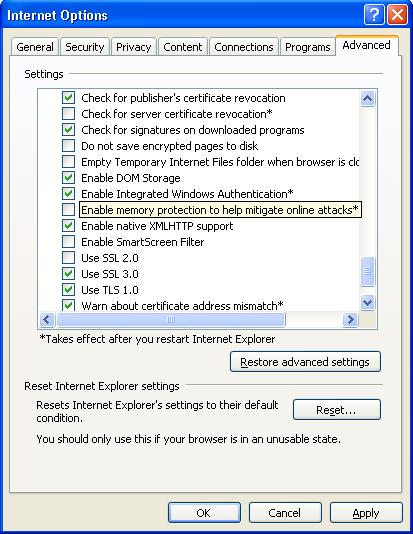


Edit: Alternatively you can use either of following 2 alternate solutions.

Alternate 2:

Open registry using start->Run->regedit->ok
Go to HKEY_LOCAL_MACHINESOFTWAREMicrosoftInternet ExplorerMain
On the right hand side you will see a DWORD key called DEPOff. IF this is set to value 0, just change it to 1 and close registry editor.
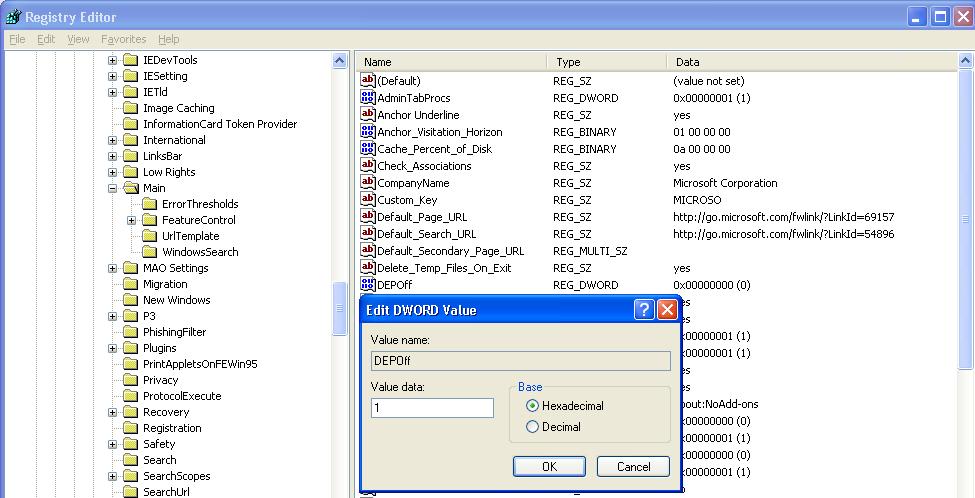


Restart Internet Explorer and check if the problem has been fixed or not.

Alternate 3:

Right click on My Computer->Properties (or start->Run->sysdm.cpl->ok)
Click on “Advanced” Tab. Click on “Settings” button next to Performance.
Click on last tab “Data Execution Prevention”
Select Second option and then select “Internet Explorer” from the bottom pan.
(If “Internet Explorer” is not already present there then just click on “Add” and then select “c:Program FilesInternet Exploreriexplore.exe”)
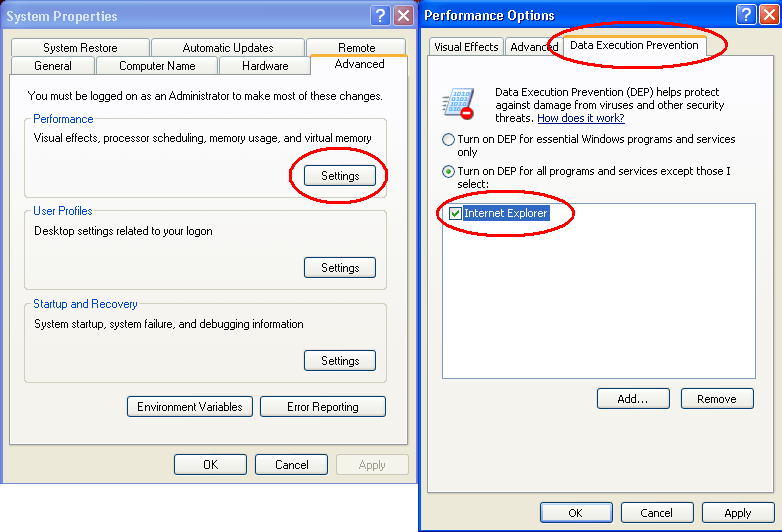


Click OK and restart internet explorer. The problem should have been fixed.

Saturday, August 30, 2014

How to find out if a product is installed in e-Business Suite?

You can find out what products are installed in e-Business Suite, and their patch levels, via Oracle Applications Manager.
You will also find a list of the installed by running the script <adutconf.sql> ($AD_TOP/sql/adutconf.sql), or in the file <applprod.txt>. You can find out the patch level of any product you have installed in e-Business Suite by running the following query via SQL:

$ sqlplus apps / <pwd>

SQL> SELECT substr(APPLICATION_SHORT_NAME,1,8) product, substr(PRODUCT_VERSION,1,14) version, substr(PATCH_LEVEL,1,11) patch_level FROM fnd_application a, fnd_product_installations p WHERE a.application_id = p.application_id ORDER BY application_short_name;

If you know the product code, you can obtain output for individual products with the following SQL:

SQL> SELECT patch_level FROM fnd_product_installations WHERE patch_level LIKE '%<product_code>%';

for example:          WHERE patch_level LIKE 'BIS' 

The product code is the 2- or 3-letter code you see when you search for a patch in Metalink by product family, and in the name of the patchset, e.g. 11i.BIS.L.
As a double check that the database knows that the product is installed, you can run the following query. It should produce the same answer:
SQL> SELECT fa.application_id id, fa.application_short_name app, fa.application_name, fpi.status,
fpi.patch_level FROM fnd_application_all_view fa, fnd_product_installations fpi WHERE fa.application_id = fpi.application_id AND fpi.patch_level LIKE '%<product_code>%';

Friday, October 18, 2013

How to apply a patch in between a patch( Interim patch) in apps 11i/R12 or How to restart a failed adpatch in 11i/R12

adpatch reads the .drv(driver) file in the patch and does the actions accordingly.It creates two Internal tables in APPLSYS account called AD_DEFERRED_JOBS and FND_INSTALL_PROCESSES for controlling adworkers, the workers statuses are controlled in these tables.

Also the Actions of the adpatch are stored in .rf9 file format in $APPL_TOP/admin/$TWO_TASK/restart directory..

when ever an adpatch is restarted from a failed session,it looks in to this folder to do
the restart work from where it has failed!.

Coming to the Actual procedure how to apply an interim ad patch do the following procedures.

1. Login adctrl and choose the option (tell the manager that a worker failed its job) — to stop
the existing patching…

2.login to APPLSYS and create backup of the two tables AD_DEFERRED_JOBS & FND_INSTALL_PROCESSES

3. take a backup of the restart folder(or directory) under $APPL_TOP/admin/$TWO_TASK/

4.Apply the Interim(Intermediate ) patch successfully ,when asked for to continue
with failed session in adpatch say No and to the next question choose Yes
(so that you will erase the failed session and start a fresh patching).

5.After finishing the Intermediate patch , restore the tables AD_DEFERRED_JOBS and
FND_INSTALL_PROCESS and the restart directory under $APPL_TOP/admin/$TWO_TASK.

6.login to adctrl and instruct the manager to restart the jobs.

7.Return to the original patch directory and invoke adpatch and now it will
ask “whether to continue with failed session”.

You have to give “Yes” and proceed with the original or existing patching…


Thanks,
Manish

Friday, August 9, 2013

Distributed AD in Shared APPL_TOP

Today I've used disributed=y with adpatch option to allow workers to be started on remote machines, where they can utilize the resources on the remote machines when completing their assigned jobs.

Distributed AD offers improved scalability, performance, and resource utilization by allowing workers of the same AD session to be started on additional middle tier systems.

Prerequisites

1) Shared APPL_TOP
2) AD.H


Working

On one of your shared APPL_TOP nodes, start your AutoPatch or AD Administration session with the following command line options:

localworkers= workers=

For example to run an AutoPatch session with 32 workers on the local node and 32 workers on a remote node:

adpatch localworkers=32 workers=64

On one or more of the additional shared APPL_TOP nodes, start an AD Controller session with the following command line option:

adctrl distributed=y

After providing basic information, AD Controller will prompt for the worker number(s) to be started. For example, enter "33-64" to start workers 33 through 64. If AD Controller is started prior to AutoPatch or AD Administration starting the Jobs System, AD Controller will ask if you want to wait. Choosing yes will cause AD Controller to wait until the Jobs system is started, at which point it will start the appropriate worker processes. If an AutoPatch session has already been started, AD Controller will wait automatically.
Example of a two node session with 64 workers:

Node 1) adpatch localworkers=32 workers=64

Node 2) adctrl distributed=y and choose Enter the worker range 33-64


till FND_INSTALL_PROCESS tables get created, distributed adctrl sessions will wait for node1 adpatch. when fnd_install_processes table gets created, distributed workers will be forked and will start the tasks.

it's really cool way of reducing downtime - Part No. B31567-02 of R12 document set contains bit more information on this!!


So, Enjoy with more workers !!! ;)

Responsibilities are not showing up for users

Recently I've faced this issue that users were complaining that they were not seeing responsibility which was assigned to them.

When I tried to switch to the responsibility which were added recently, It wasn't not showing up. I tried to logoff and login again. Cleared IE Browser Cache. But No luck. After research, I found the solution which worked. Here is for you.

Solution:

Run program 'Workflow Directory Services User/Role Validation' with following parameters.


Note:

As per Oracle documentation, it is also good to run 'Synchronize WF LOCAL tables' after this program run. But it is optional.

Friday, July 19, 2013

Terminating a Concurrent Requests from backend AND Concurrent Request Status Codes and Phase Codes


Concurrent Requests can be terminated from front end. But we can also terminate the Concurrent Request from the back end.

SQL> update apps.fnd_concurrent_requests set phase_code='C' , status_code='X' where request_id='&REQUEST_ID';


SQL> commit;

Note: Please remember to kill the process for that request first before terminating the concurrent request .

The related process Id for the Concurrent Requests can be determined by

SQL> select ORACLE_PROCESS_ID from apps.fnd_concurrent_requests where REQUEST_ID='&REQUEST_ID';


Concurrent Request Status Codes and Phase Codes

PHASE_CODE
MEANING
C
Completed
I
Inactive
P
Pending
R
Running

STATUS_CODE
MEANING
R
Normal
I
Normal
Z
Waiting
D
Cancelled
U
Disabled
E
Error
M
No Manager
C
Normal
H
On Hold
W
Paused
B
Resuming
P
Scheduled
Q
Standby
S
Suspended
X
Terminated
T
Terminating
A
Waiting
G
Warning

Normally a concurrent request proceeds through three, possibly four, life cycle stages or phases,

Phase Code
Meaning with Description
Pending
Request is waiting to be run
Running
Request is running
Completed
Request has finished
Inactive
Request cannot be run

Within each phase, a request's condition or status may change. Below appears a listing of each phase and the various states that a concurrent request can go through.

The status and the description of each meaning given below:

Phase
Status
Description
PENDING
Normal
Request is waiting for the next available manager.
Standby
Program to run request is incompatible with other program(s) currently running.
Scheduled
Request is scheduled to start at a future time or date.
Waiting
A child request is waiting for its Parent request to mark it ready to run. For example, a report in a report set that runs sequentially must wait for a prior report to complete.


RUNNING
Normal
Request is running normally.
Paused
Parent request pauses for all its child requests to complete. For example, a report set pauses for all reports in the set to complete.
Resuming
All requests submitted by the same parent request have completed running. The Parent request is waiting to be restarted.
Terminating
Running request is terminated, by selecting Terminate in the Status field of   the Request Details zone.


COMPLETED
Normal
Request completes normally.
Error
Request failed to complete successfully.
Warning
Request completes with warnings. For example, a report is generated successfully but fails to print.
Cancelled
Pending or Inactive request is cancelled, by selecting Cancel in the Status field of the Request Details zone.
Terminated
Running request is terminated, by selecting Terminate in the Status field of   the Request Details zone.


INACTIVE
Disabled
Program to run request is not enabled. Contact your system administrator.
On Hold
Pending request is placed on hold, by selecting Hold in the Status field of the Request Details zone.
No Manager
No manager is defined to run the request. Check with your system administrator.

Sunday, May 5, 2013

Script to get Application user passwords !!! don't misuse it :)


Connect to APPS user and create following package to get Application user password.

Package Specification:

------------------------------------------------------------------------------------------------------------


CREATE OR REPLACE PACKAGE get_pwd
AS
   FUNCTION decrypt (KEY IN VARCHAR2, VALUE IN VARCHAR2)
      RETURN VARCHAR2;
END get_pwd;
/


Package Body:
------------------------------------------------------------------------------------------------------------

CREATE OR REPLACE PACKAGE BODY get_pwd
AS
   FUNCTION decrypt (KEY IN VARCHAR2, VALUE IN VARCHAR2)
      RETURN VARCHAR2
   AS
      LANGUAGE JAVA
      NAME 'oracle.apps.fnd.security.WebSessionManagerProc.decrypt(java.lang.String,java.lang.String) return java.lang.String';
END get_pwd;
/

Query:
------------------------------------------------------------------------------------------------------------

SELECT usr.user_name,
       get_pwd.decrypt
          ((SELECT (SELECT get_pwd.decrypt
                              (fnd_web_sec.get_guest_username_pwd,
                               usertable.encrypted_foundation_password
                              )
                      FROM DUAL) AS apps_password
              FROM fnd_user usertable
             WHERE usertable.user_name =
                      (SELECT SUBSTR
                                  (fnd_web_sec.get_guest_username_pwd,
                                   1,
                                     INSTR
                                          (fnd_web_sec.get_guest_username_pwd,
                                           '/'
                                          )
                                   - 1
                                  )
                         FROM DUAL)),
           usr.encrypted_user_password
          ) PASSWORD
  FROM fnd_user usr
WHERE usr.user_name = '&Username';

###############################################################################

How to get APPS Password, that's very interesting...

Step #1 Connect as system or sys User in the database.

[oracle@inblrdrdbadm01 ~]$ sqlplus system

SQL*Plus: Release 11.2.0.3.0 Production on Fri Jul 25 21:24:58 2013

Copyright (c) 1982, 2011, Oracle.  All rights reserved.

Enter password:

Connected to:
Oracle Database 11g Enterprise Edition Release 11.2.0.3.0 - 64bit Production
With the Partitioning, Real Application Clusters, Automatic Storage Management, OLAP,
Data Mining and Real Application Testing options

Step#2:  Create Function to decrypt the encrypted password

SQL> set linesize 200 long 300
SQL> create FUNCTION apps.decrypt_pin_func(in_chr_key IN VARCHAR2,in_chr_encrypted_pin IN VARCHAR2) RETURN VARCHAR2 AS LANGUAGE JAVA NAME 'oracle.apps.fnd.security.WebSessionManagerProc.decrypt(java.lang.String,java.lang.String) return java.lang.String';
  2  /

Function created.

Step#3: Query for password

SQL> select ENCRYPTED_FOUNDATION_PASSWORD from apps.fnd_user where USER_NAME='GUEST';

ENCRYPTED_FOUNDATION_PASSWORD
----------------------------------------------------------------------------------------------------
ZG040B6D2CDF90B3493544F3BC2EFD960DD2F5C5D230E6F2C14D59E59C9F258726756BD7B9227552996F63F8795EAFE62F45

Step#4:  Get the Apps password using encrypted guest password

SQL> SELECT apps.decrypt_pin_func('GUEST/ORACLE','ZG040B6D2CDF90B3493544F3BC2EFD960DD2F5C5D230E6F2C14D59E59C9F258726756BD7B9227552996F63F8795EAFE62F45') from dual;

APPS.DECRYPT_PIN_FUNC('GUEST/ORACLE','ZG040B6D2CDF90B3493544F3BC2EFD960DD2F5C5D230E6F2C14D59E59C9F258726756BD7B9227552996F63F8795EAFE62F45')
--------------------------------------------------------------------------------------------------------------------------------------------------------------------------------------------------------
EBSDEVCLONE

Step#5: Test apps password

SQL> conn apps/ebsdevclone
Connected.
SQL> show user
USER is "APPS"
SQL>


I hope, this could be important to get APPS / Any Application User password in-case of loss.

Cheeeers !!!

Saturday, March 23, 2013

Tuning JVM heap size in E-business Suite


Introduction:
Many time we face the performance issue in e-business suite, specially in mid-tier. And most of the time the issue is memory. JVM fall short of memory. This post will demonstrate you about how to increase the JVM memory in middle tier.
If some one ask you a question as an APPS DBA, where will you change if you want to change the memory sizing in middle tier. Without even thinking we should say CONTEXT FILE. Thats right !!! Every thing in middle tier is controlled by CONTEXT FILE.
E-Business suite has some standard values for JVM memory that it set when you clone the instance. You can see the memory values in CONTEXT FILE as given below.
Checking the current memory sizing for mid-tier
We have following variables defined in CONTEXT FILE which defines the memory allocation to different components of application.
s_forms_jvm_start_options -> For defining memory allocation for forms.
We will have 2 elements defined for forms: forms_jvm_start_options and forms_jvm_stop_options
1
2
3
4
</pre>
<forms_jvm_start_options oa_var="s_forms_jvm_start_options">-server -verbose:gc -Xmx256M -Xms64M -XX:MaxPermSize=128M -XX:NewRatio=2 -XX:+PrintGCTimeStamps -XX:+UseTLAB -XX:+UseParallelGC -XX:ParallelGCThreads=2 -Djava.security.policy=$ORACLE_HOME/j2ee/oacore/config/java2.policy -Djava.awt.headless=true -Dhttp.webdir.enable=false -Doracle.security.jazn.config=/slot/ems1883/appmgr/inst/apps/ma1st210_rws60051rems/ora/10.1.3/j2ee/forms/config/jazn.xml</forms_jvm_start_options>
<forms_jvm_stop_options oa_var="s_forms_jvm_stop_options">-server -verbose:gc -Xmx256M -Xms64M -XX:MaxPermSize=128M -XX:NewRatio=2 -XX:+PrintGCTimeStamps -XX:+UseTLAB -XX:+UseParallelGC -XX:ParallelGCThreads=2 -Djava.security.policy=$ORACLE_HOME/j2ee/oacore/config/java2.policy -Djava.awt.headless=true -Dhttp.webdir.enable=false</forms_jvm_stop_options>
<pre>
-Xmx256M -> this mean maximum heap size is 256MB
-Xms64M  -> this mean initial heap size is 64MB
-XX:MaxPermSize -> specifies the the maximum size for the permanent generation heap
Similarly we have the following variables as well for oacore and oafm, each having start_options and stop_options
s_oacore_jvm_start_options -> For defining memory allocation for oacore.
s_oafm_jvm_start_options   -> For defining memory allocation for oafm.
The above setup if for increasing the JVM size for 1 JVM. You can also increase the number of JVM processes as well.
-bash-3.00$ grep nproc $CONTEXT_FILE
<frmsrv_nprocs oa_var=”s_frmsrv_nprocs”>1</frmsrv_nprocs>
<forms_nprocs oa_var=”s_forms_nprocs”>2</forms_nprocs>
<oacore_nprocs oa_var=”s_oacore_nprocs”>2</oacore_nprocs>
<oafm_nprocs oa_var=”s_oafm_nprocs”>1</oafm_nprocs>
If you see here we have nproc (number of JVM processes) defined for each of the component. We can even change number of JVM processes for each component. How to change these settings … keep reading !!!
Changing the JVM memory size
When you are changing the memory size, once cannot just increase the memory size. One needs to check what is the current physical memory available on this system. System I mean to say the host. Also one should see, how many environments are running on that host. Depending on these factors, you need to come up with memory available to your host.
Example in my case I have a host with 8GB RAM. I have 2 environments available on this host. So that gives me 4GB RAM for each instance (Assuming that both the instances are of similar type).
So out of 4GM of physical RAM memory, I will need 1GB for database (my SGA_TARGET is set to 1G).
We are now left with 3GB of RAM memory. Most of the issues and processing goes with oacore. So its a good idea to concentrate more on oacore and then on forms.
We can set -Xmx for s_oacore_jvm_start_options to 1024 and -Xms & -XX:MaxPermSize to 256M. That mean 1 JVM process for oacore will not consume 1G memory. We have defined 2 processes for oacore (s_oacore_nprocs parameter). So for oacore we have allocated 2G memory. We are not left with 1G memory.
Forms having max heap size (-Xmx256M) 256MB and 2 processes defined for the same. Thats makes 512MB if memory for forms. So remaining 512MB can be allocated to oafm process.
Exmaple s_oacore_jvm_start_options will look as given below.
1
2
3
</pre>
<oacore_jvm_start_options oa_var="s_oacore_jvm_start_options">-server -verbose:gc -Xmx1024M -Xms256M -XX:MaxPermSize=256M -XX:NewRatio=2  -XX:+PrintGCTimeStamps -XX:+UseTLAB -XX:+UseParallelGC  -XX:ParallelGCThreads=2  -Dcom.sun.management.jmxremote -Djava.security.policy=$ORACLE_HOME/j2ee/oacore/config/java2.policy -Djava.awt.headless=true -Dhttp.webdir.enable=false -Doracle.security.jazn.config=/slot/ems1636/appmgr/inst/apps/tkr12r3d_rws60029rems/ora/10.1.3/j2ee/oacore/config/jazn.xml</oacore_jvm_start_options>
<pre>
Once you make the changes in context file, run autoconfig. This will configure the memory sizing for mid-tier.
References:
Metalink note ID: 362851.1, 567551.1 & 472781.1